
Quickstart to sclang
Contents
Quickstart to sclang
SuperCollider and sclang are often used synomynous, but it helps for a better understanding to keep those terms separated. For this part we will get the first steps into sclang, the programming language of the SuperCollider environment.
sclang is a programming language which is heavily inspired from programming languages such as Smalltalk and Lisp - but if you are not familiar with those programming languages it is not a problem as we will take a look at how to come around.
The easiest way to start programming in sclang is by starting the scide, which often simply gets installed as SuperCollider on your system. After this you should see something along
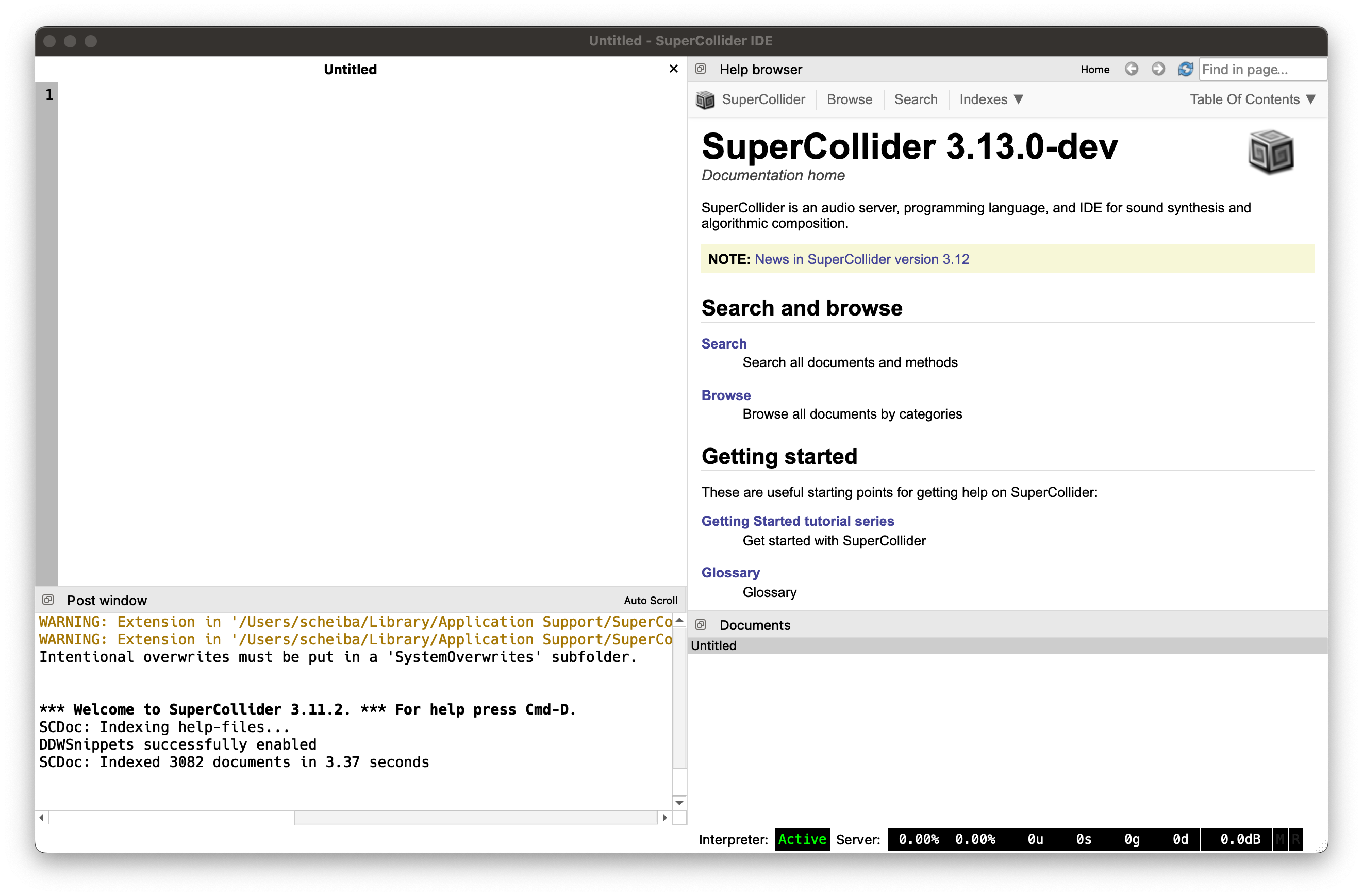
Fig. 1 The SuperCollider IDE (scide): In the empty document we can insert sclang code, on the right we see the documentation and on the bottom we have the post window which shows us the results of the evaluated sclang code. The placings of each tiles can vary and can also be adjusted via the Windows tab.
Exectuing statements
The most simple statement in sclang is probably the calculation of a number.
To run the calculation simply type in the statement seen below and hit ctrl+enter on Windows/Linux and cmd+enter on macOS while the cursor is in the same line of the statement to execute the line.
2+2;
-> 4
You will see the result -> 4 in the post window. Congrats on running your first line of code and also your first calculation within sclang.
So how does the infamous Hello World program look like in SuperCollider, a programm which should simply print out Hello World?
"Hello World".postln;
Hello World
-> Hello World
We surround our string we want to print with " and append a . to tell sclang to run the method postln on the string, which will print the string to our post window.
We end each statement in sclang with a ; which we can omit if we only evaluate a single statement, but it is best practice to always write it down.
But regarding the output in our post window: why do we see the string Hello World two times?
This is because the post window will also always print the return value of the statement (aka line of code).
In sclang every statement will return something - in our case the postln method returns the element it was called with, therefore we see Hello World two times: Once due to our postln statement and once because the interpreter also prints the return value of our statement.
We could therefore simply also just say
"Hello World";
-> Hello World
Questions and exercises
Try out and modify the Hello World program
What indicates the
.in"Hello World".postln?Why can we omit the
.postlnstatement in our last example?
Primitives
Primitives are the basic data entities of a programming language and allows us to store different kind of data. We will later see on how we can combine multiple of such primitive data types, allowing us to store more complex data as well.
Integer
An integer represents a whole number which we will use a lot during programming SuperCollider to e.g. enumerate multiple items, but we are getting ahead of ourselves.
We have already seen integers above where we executed 2+2 and they are simply written down like
42;
-> 42
Float
Floating point numbers (also called floats) represent any whole and not-whole numbers. Those can occur due to fractions, roots or allow us to reperesent irrational numbers like \(\pi\) within some accuracy, see floating point precision. As \(pi\) has infinite digits we could not store them in our computer memory as this would need an infinite amount of memory as well, therefore we reperesnt such numbers only within a margin which is often good enough.
4.343;
-> 4.343
pi
-> 3.1415926535898
A whole number (aka an Integer) can also be written as a float, therefore any integer can be written as a float but not vice versa.
42.0
-> 42.0
String
We have already seen a string in our Hello World example. Strings allow us to store a line of characters which often represent text.
"a string";
-> a string
Boolean
Every programming language needs to provide a way to represent the two boolean values, if something is true or not.
In sclang this is represented by true and false.
true
-> true
false
-> false
We can simply construct a boolean statement by comparing two primitives. Here we want to check if \(2+2=5\) is true or if \(2+2=4\) is true.
2+2==5
-> false
2+2==4
-> true
Symbol
A Symbol may look like a String but they are actually really different in a specific detail.
Instead of surrounding our string with " we prepend a \ to it or surround it with '.
Note that the first writing restricts ourselves to not use a space in a symbol.
\symbol
-> symbol
'another symbol'
-> another symbol
So for what do we need the Symbol if we have a string? This is already an advanced topic, but as we will need this a lot in sclang and you will get this wrong at some point it is good to learn this already at the beginning. Basically we can say
Use a string if you use a (long) text
Use a symbol if you want to reference something by a name
So if you want to give an object a name under which you can later find it: use a symbol. If you simply want to print out some text: A string is good enough for this.
The difference between a string and a symbol lies here:
"foo" === "foo"
-> false
\foo === \foo
-> true
where === compares the actual memory address of the variable (== compares only its values).
Checking for memory address is important when referencing something by name or when working with Dictionary, which store under a key (e.g. a Symbol) some value (e.g. an Integer).
nil
nil is a special concept in a programming language, often also associated with None or null.
It represents empty or non-initiated data and is useful to see if something was set to e.g. an integer or if it was set not at all.
You will learn to appreciate it when writing programs as it often allows you to implement default values which are only used if explicetely set.
nil
-> nil
Questions and exercises
What is the difference between an Integer and a Float?
When to use a Symbol and when to use a String?
Construct a boolean statement with each primitive.
Combining primitives
Those were all the datatypes that we have available and those are already sufficient to build more complex buildings by combining them.
Have in mind that all these discussed primitives are already abstractions in form of bytes and bits (0s and 1s), the only thing that a computer can work with.
Array
Arrays or lists are a way to store multiple items and access them later via an index by accessing the \(i\)-th item of the array by surrounding it with [ and ] behind our array.
This is similiar to a notion of a vector from mathematics or like pages in a book.
Within a list we can store any kind of primitive next to each other.
["a", 2, 4.0, true]
-> [ a, 2, 4.0, true ]
We now want to access the \(4\)-th item of the array. Note that sclang, as almost all programming languages, start counting at \(0\), therefore we have to write \(3\) instead of \(4\).
["b", 4, 3.0, \foo, false][3]
-> foo
But what happens if we access the \(5\)-th item if our array only consists of \(3\) items?
[0, 1, 2][4]
-> nil
It will return nil, giving us a hint that we have accessed empty data.
To create an empty array we simply use
[]
-> [ ]
Dictionary
Dictionaries allow us to store a value under a key.
We surround them with ( and ) and separate the key from the value with a : and separate multiple key/value pairs in our dictionary with an ,.
Here we will create a dictionary which maps the Symbol a to the Integer \(42\) and the symbol b to integer \(43\).
(\a: 42, \b: 43)
-> ( 'a': 42, 'b': 43 )
We can access the value of a dictionary similiar to an array, but instead of the position we use the key.
(\a: 42, \b: 43)[\a]
-> 42
Accessing a non existing key will return us nil.
(\a: 42, \b: 43)[\c]
-> nil
As noted earlier it is important to use symbols instead of strings for our dictionary keys, which is demonstrated by this small example.
("a": 42, "b": 43)["a"]
-> nil
Dictionaries are really powerful as we can also nest them or also store Arrays in it. Try to understand the following line.
(\a: (\some: \nested), \b: [42, 45])[\a][\some]
-> nested
To create an empty dictionary (so without any key/value pairs) we simply write
()
-> ( )
Questions and exercises
Which index has the item
3in[1, 2, 3, 4]?What is the return value when accessing an emtpy index in an array? What is returned when accessing an empty key in an dictionary?
Write a nested dictionary which returns
"hello world"when accessed via[\what][2][\say]
Multiline statements
Before we start exploring sclang further we want to mention on how to execute mulitple lines or statements at once which will become necessary at some point.
Until now we always executed statements which were not longer than 1 line, therefore the tailing ; was optional, but this becomes now mandatory.
To run multiple statements at once we need to surround the statement with ( and ), so
(
"hello".postln;
"world".postln;
)
Move the cursor into the brackets and hit ctrl+enter on Linux/Windows or cmd+enter on macOS.
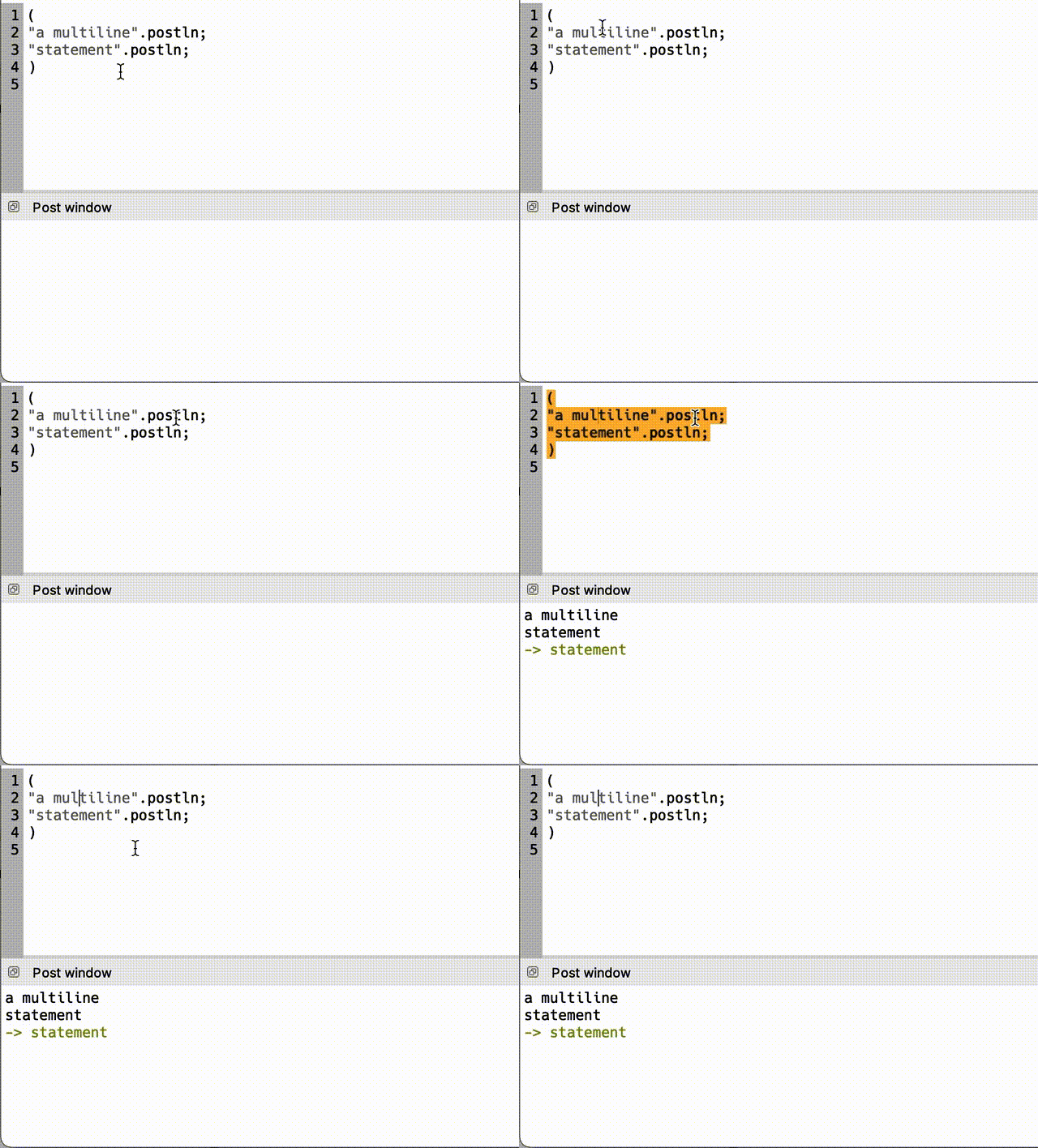
Fig. 2 Surround your multiple statements (separated by a ;) that you want to execute with brackets and move your cursor into the surrounded part of the brackets by clicking somewhere between it and execute it by pressing cmd+enter / ctrl+enter.
Important
In this documentation we will omit these brackets on multiline statements.
Each cell should be regarded as a multi-line block, surrounded by ( and ).
Variables
Variables allow us to store and modify data (so, Primitives) by referencing to it via a name.
Here we start by assigning the variable a to the Integer \(42\).
Do not confuse a with a String or a Symbol as this stores actual data, a variable is simply a name under which we can reference data and we have to respect the contsraints of the language syntax here which means that no whitespaces are allowed in a variable name.
a = 42;
-> 42
We can now regard a as a represent of \(42\) and use this in calculations.
a + 4;
-> 46
We can also store a Dictionary or a Array under a variable.
b = [0, 1, 3, 5, 10];
b[2];
-> 3
But sclang has a restriction that may seem strange: global variables (global means they are available everywhere, see Namespace later) can only have one character! Setting a variable with more than one character
abc = 42;
".postln; result = {abc = 42;}.value(); postf("-> %

  ", result); "
results in
ERROR: Variable 'abc' not defined.
There are some methods to circumvent this from which we will show two.
Using a global dictionary
The first method is to create a dictionary under a global variable name (often q) which will allow us to create a mapping of symbol keys to abitrary values, even nested dictionaries.
Sounds more complex than it actually is but it is really powerful tool.
We start by intiating an empty dictionary.
q = ();
q;
-> ( )
We can now add key/value pairs to the dictionary q via
q[\abc] = 42;
-> ( 'abc': 42 )
and can access them via
q[\abc] + 2;
-> 44
and creating a nested dictionary via
q[\foo] = (\bar: 42, \baz: 44);
-> ( 'foo': ( 'bar': 42, 'baz': 44 ), 'abc': 42 )
and access it
q[\foo][\bar];
-> 42
and can modify existing values
q[\abc] = "cde";
-> ( 'foo': ( 'bar': 42, 'baz': 44 ), 'abc': cde )
q;
-> ( 'foo': ( 'bar': 42, 'baz': 44 ), 'abc': cde )
Using environment
The usage of an Environment is actually a pretty advanced within sclang but for now we can simply use it without understanding the inner mechanics and usages within sclang.
It simply allows us to create variables with multiple chars by prepending a ~ to it.
~abc = 42;
-> 42
~abc + 4;
-> 46
Try out both ways, the global dictionary and the environment approach, to see what suits you best.
Hint
Environment uses internally a dictionary as well. The single character global variables are actually members of the Interpreter class, see here.
Questions and exercises
Why do we need environments or a global dictionary?
How do you init an empty dictionary?
Build a global dictionary
qsuch thatq[\a] + q[\b] = 40
Determine the type of a variable
To figure out the type of a variable we can execute the method .class on our variable.
This will print the name of the Class that is attached to the object and can help us understand what the variable actually holds we are inspecting and what we can do it by looking through the documentation of the attached Class.
a = 42;
a.class;
-> Integer
Comments
Comments are a crucial part when writing code to indicate any intentions which do not have place in code. Maybe something could not be solved in a trival way and had to be solved in a very difficult way, or could not be solved at all and should be regarded as a hint for other users at a later time.
Comments will not be executed and therefore they are a great way to also to temporarly deactivate specific regions of the code.
sclang allows two ways to create comments
Single line comments
A single line comment can by indicated by simply prepending // to a line
// "this is a comment".postln;
"this is not a comment".postln;
this is not a comment
-> this is not a comment
Multi line comments
To tag multiple lines as a comment we can simply surround them with \* and *\.
/* some comment
that goes across
multpile lines
*/
42+4;
-> 46
Functions
Functions are a crucial building block of any programming language and in sclang functions are first class citizens, meaning that variables can not just reference data but also functions.
Hint
For programmers: All our functions in SuperCollider are anonymous, meaning that we only refer to them via their associated variable, but they are not registered in a namespace on their own. But this is only true for functions that we define during runtime as SuperCollider only has methods in its standard library which are not anonymous.
The content of a function is surrounded by { and }.
A simple function associatde with variable f which simply prints “hello world” when executed can therefore look like this:
f = {"hello world".postln;}
-> a Function
Currently we have not seen “hello world” printed as we have not executed the function yet.
To execute the function we have multiple ways in sclang.
We can either use the .value method of the function.
f.value();
-> nil
or simply use (or call) .() on the function.
f.();
hello world
-> hello world
As our variable f is a placeholder for a function we can also run it without referencing to a variable.
This is only for demonstration purposes because a function which can only be called once and immediately is best not written as a function but can be written as is.
{"now run".postln}.();
now run
-> now run
As mentioned before every statement in sclang also returns a value - this is also true for functions and is actually where the idea of a return value originates from. In sclang the function will simply return the last statement of the function as a return statement.
Hint
Make sure to surround any multi line statements with ( and ) as mentioned in Multiline statements as we omit them here for the sake of readability.
f = {
    "this is string A";
    "and this is another string"; // this is the last statement
};
-> a Function
We can save the return value of the function into a variable again.
a = f.();
a.postln;
and this is another string
-> and this is another string
Arguments
Right now our functions did not react to its input because we have not providid any input. But functions, just like the mathematical ones, allow to have multiple inputs and react to their inputs. This combined with. Programming can be regarded as structurizing data via primitives and modify them via functions and there are different paradigms like object oriented programming which try to help you organizing this.
Because functions can react dynamically they are really powerful as they allow us to abstract and encapsule logic. There are two ways in sclang to add arguments to our function and we will show both so you know em both, then just decide for yourself what you prefer.
Both times want to write a function which simply takes two arguments \(a, b\) and returns the sum of both, \(a+b\). Remember that the last statement within a function will also be returned in sclang.
Hint
sclang also implements some functional programming paradigms, see Functions and partial application.
arg style
f = {arg a, b;
    a+b;
};
-> a Function
f.(3, 6);
-> 9
It comes down to a matter of preference which you want to use but it is good to know both ways as you will come across both writings when reading documentation or other tutorials.
Default parameters
f = {|a=0, b=0|
    a+b;
}
-> a Function
f.();
-> 0
Questions and exercises
How could you return more than one value from a function?
Write a function which multiplies all of its three inputs which default to \(1\) if not specified.
Write a function which greets you with your name which you provide as input, such as “Hello Dave”. For this take a look at the format method of the String class.
Callbacks
If you have programmed JavaScript before you are probably familiar with the concept of callbacks but if not you will learn it now. Basically a callback is a function which gets called when somethings happened - e.g. if something that took a long time has terminated with a result or if a value of something changed.
Assume we have a slider on a MIDI Controller and want to attach its value to a variable. A naive approach would be to simply write (note that this is pseudo-code and not actual sclang code)
a = MidiSlider.value;
but this would only associate the value of the MidiSlider only when we exectue the line, but would not update it afterwards when we move the MIDI slider.
Here a callback comes in handy as we simply provide a function which will update the value of a with the value from the slider.
But how do we get the current value of the slider? Well, a callback function can also receive an argument, and the callback function is often called in such a way that the first argument is e.g. the new value of the MIDI slider.
Wrapping everything together, the pseudo-code from above would look something like
MidiSlider.onChange = {|newValue| a = newValue };
It is a bit reverse thinking but you will get used to it after some practice.
Namespace
Namespaces (or closures) are allow us to create a new context in which we can define variables. As these are not global variables but local variables (we will see in a minute what the difference is) we can also use variable names with more than one character.
A namespace is everything that is encapsulated in a multi line statement, so within ( and ).
var foo = 42;
foo + 4;
-> 46
Note that this means they are only available within the namespace and not in an outside (or new) namespace.
foo;
".postln; result = {foo;}.value(); postf("-> %

  ", result); "
In this context we can not access foo anymore because it resides in a different namespace.
We need to define the variables of the namespace at the beginneg of the namespace and prepend var to it.
"hello".postln;
var world = "world";
Does not work because we declare a variable after a statement. A way to fix this would be
var world;
"hello".postln;
world = "world";
world.postln;
hello
world
-> world
Note that each function also creates a new namespace, but we need to declare our variables always at the top of a namespace!
f = {|a, b|
    var result = a + b;
    result;
};
-> a Function
f.(42, 42);
-> 84
Classes
Classes are used in a programming paradigm called object oriented programming (OOP) which relies on the concept of a Class (which behaves like a blueprint) and instances of this class, called objects.
The class describes what data and functions a class can have and the object actually fills the data of the class.
We can create e.g. a class called Car on which we want to store the variables
name
color
location
To actually do something with the class we need to create an object out of it, like
carA = Car(name: \danube, color: \blue, location: \rome)
and another car with
carB = Car(name: \rhine, color: \blue, location: \graz)
We can now use these two cars to compare the colors, e.g. carA.color == carB.color which would return true, but we can also attach function to these cars, allowing for a repainting, a change of location or the calculation of a distance to another city based on its current location.
Although sclang is a purely object oriented programming language we can only add Classes during compile time, so for the beginnig you probably will not write so much classes, yet it is important to understand them as you will interact with them all the time as
everything is an object
in sclang.
Everytime you will see a word beginnig with capital letters (like Car) it indicates a class, where carA is an object.
Functions which are in the namespace of a class and can therefore also access the data within the class are called methods.
E.g. .postln from "Hello world".postln is actually a method on the String class which will run the postln function of "Hello world".
In the beginnig this concept can be quite tricky, but as always, with some practice you will get used to it and once you have a project where you want or need to write your own classes you will probably understand it, but for now it is more important to understand them and know the vocabulary.
Control structures
if
An if function allows to separate branches based upon a given condition. sclang allows two ways to write them.
The first way is to create a boolean of our statement and apply the if method on it where the first argument is the function (callback) which will get called if the condition is true and the second function will get called if the condition is false.
// create a random variable between 0 and 9
a = 10.rand.postln;

(a>5).if({"a is bigger than 5"}, {"a is smaller than 5"});
8
-> a is bigger than 5
Alternatively we can also use the if function where the first argument is our condition which we want to evaluate, the second argument is the function which will get called if the condition is true and the third argument is the function which will get called if the condition is false.
a = 10.rand.postln;
if(a>5, {"a is bigger than 5"}, {"a is smaller than 5"});
4
-> a is smaller than 5
for
We already introduced lists before and lists are always are associated with a for loop which allows us to perform a block of operations (so, a function) for each element of the list.
["hello", "world", "!"].do({|item|
    item.postln;
});
hello
world
!
-> [ hello, world, ! ]
Documentation
At the beginnig of learning a language it necessary to navigate for help. Here we want to discuss some basic methods that sclang and scide provide you in case you are in need for help.